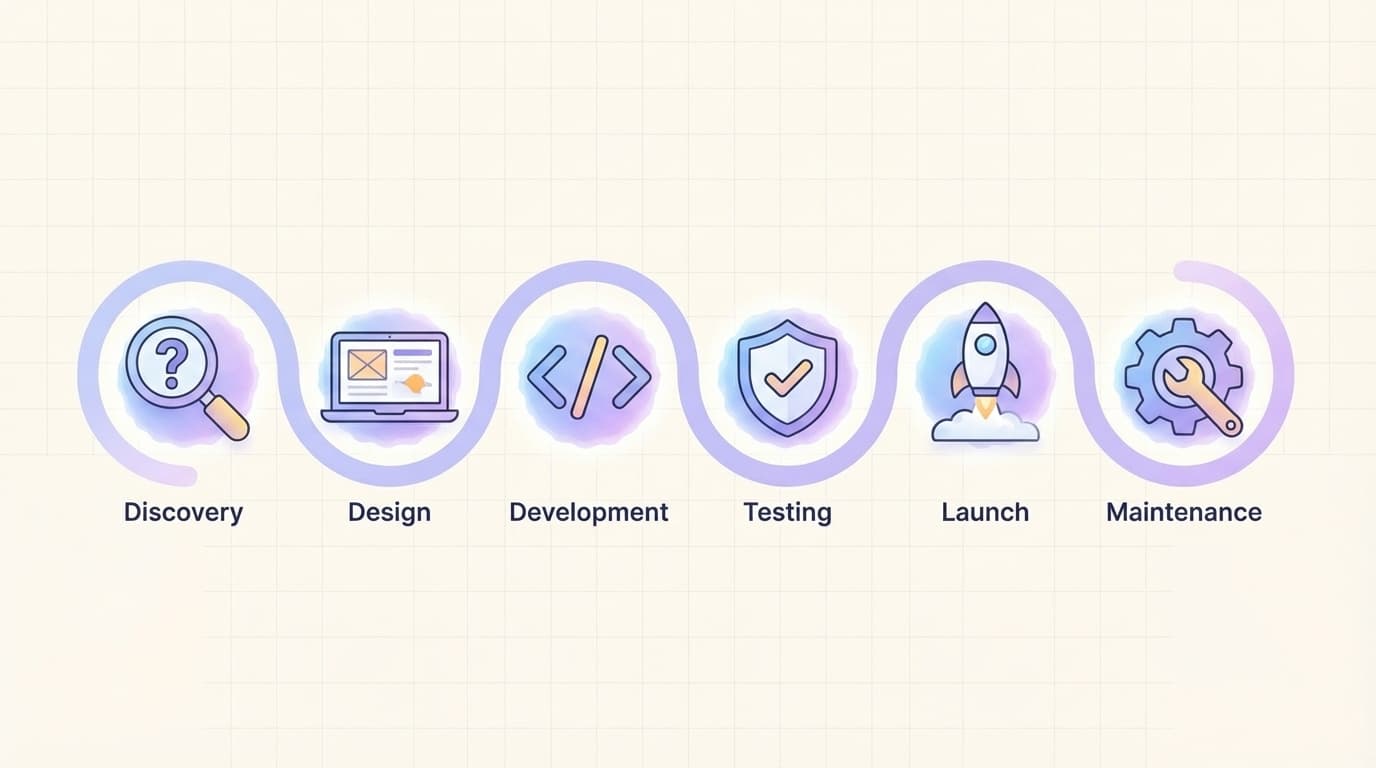
In the fast-evolving digital world of 2026, finding the best workflow for managing web projects can be the difference between missed deadlines and delighted clients. The best workflow for managing web projects combines structured planning with agile flexibility, helping design and development teams collaborate smoothly while keeping scope, budget, and timelines under control. Whether you run a small agency or lead an in-house team, adopting the best workflow for managing web projects ensures every website launch feels predictable and professional. This proven approach draws from real-world practices used by top teams and delivers measurable results—fewer revisions, faster delivery, and higher-quality outcomes.
The best workflow for managing web projects works because it breaks complex builds into clear, repeatable phases while allowing room for feedback and iteration. By following it consistently, you avoid common pitfalls like scope creep and last-minute surprises.
Why the Best Workflow for Managing Web Projects Matters More Than Ever
Web projects today involve tighter timelines, AI-assisted tools, and cross-functional teams working remotely. Without a solid system, even simple sites can spiral into chaos. The best workflow for managing web projects provides visibility for everyone—stakeholders see progress in real time, while teams stay focused on high-value tasks. According to expert guides on website project management, organizations that standardize their process complete projects up to 30% faster with fewer errors.
This hybrid approach—Waterfall for early planning and Agile for execution—has become the gold standard. It aligns perfectly with strategies from our previous post on project planning tips for design and development teams.
Phase 1: Discovery and Planning
Every successful web project starts with deep discovery. In the best workflow for managing web projects, spend the first 10-15% of your timeline here. Gather requirements through stakeholder interviews, competitor analysis, and user personas. Define clear goals, success metrics, and technical constraints.
Create a detailed project charter and scope document. Use tools like Notion or monday.com to map out a high-level roadmap. This phase prevents 80% of later rework by setting realistic expectations upfront. Link this step to our earlier guide on how to manage client projects without missing deadlines for seamless client alignment.
Phase 2: Design and Prototyping
Move into visual planning once requirements are locked. The best workflow for managing web projects emphasizes rapid prototyping in Figma or Framer. Designers create wireframes, mood boards, and interactive prototypes that developers can review early.
Schedule collaborative reviews to catch usability issues before coding begins. Incorporate AI tools for quick variations—2026 workflows often use generative design features to speed this up. Keep iterations time-boxed to maintain momentum.
** [Image: Clean Figma-style wireframe and prototype dashboard for a modern website project, showing user flow, color palette, and responsive views in a professional layout, alt text: "best workflow for managing web projects using design prototypes"] **

Phase 3: Development and Coding
This is where the site comes to life. Follow the best workflow for managing web projects by breaking development into short sprints—typically two weeks each. Developers work from approved prototypes, using version control like GitHub and component libraries such as ShadCN with Tailwind CSS for speed.
Daily stand-ups and automated testing keep everyone aligned. Integrate with Jira or Linear for task tracking, as these tools shine for engineering teams in 2026. Focus on mobile-first, accessible code that meets current performance standards.
Phase 4: Testing and Quality Assurance
Never skip rigorous testing in the best workflow for managing web projects. Run functional, cross-browser, and performance tests using tools like BrowserStack or Lighthouse. Involve real users for usability feedback during this phase.
Automate what you can—regression tests and security scans save hours. Fix issues immediately and retest. This step ensures the final product is polished and reliable before launch.
| Phase | Key Activities | Recommended Tools | Typical Duration |
|---|---|---|---|
| Discovery & Planning | Requirements, goals, roadmap | monday.com, Notion | 1-2 weeks |
| Design & Prototyping | Wireframes, prototypes, reviews | Figma, Framer | 2-4 weeks |
| Development & Coding | Build, integrations, code reviews | Jira, Linear, GitHub | 4-8 weeks |
| Testing & QA | Functional, performance, user tests | BrowserStack, Lighthouse | 1-2 weeks |
| Launch & Deployment | Go-live, monitoring | Vercel, Cloudflare | 1 week |
| Maintenance | Updates, analytics, optimizations | Google Analytics, Ahrefs | Ongoing |
Phase 5: Launch and Deployment
The big day arrives. The best workflow for managing web projects includes a controlled rollout with staging environments. Use CI/CD pipelines for seamless deployment. Monitor server performance and user behavior immediately after go-live.
Have a rollback plan ready and communicate launch details to all stakeholders. Celebrate the milestone internally to keep team morale high.
** [Image: Modern project management dashboard showing web project launch checklist, deployment timeline, and live analytics in a clean interface, alt text: "best workflow for managing web projects during launch and deployment phase"] **

Phase 6: Post-Launch Maintenance and Optimization
The best workflow for managing web projects doesn’t end at launch. Schedule 30- and 90-day check-ins to review analytics and implement improvements. Plan for ongoing security updates, content refreshes, and SEO tweaks.
Document everything in a shared knowledge base so future projects benefit from lessons learned. This continuous improvement loop turns one-off projects into long-term client relationships.
External resources confirm this phased approach: detailed website project management guides highlight how combining planning with iterative execution delivers the strongest results.
By adopting this complete system, you’ll master the best workflow for managing web projects and consistently deliver websites that impress. Start small by mapping your next project to these phases—you’ll see immediate improvements in efficiency and team satisfaction.
Thumbnail Image Prompt: A clean, minimal, and simple flat-design illustration featuring a streamlined web project workflow timeline with icons for discovery, design, development, testing, launch, and maintenance phases connected by smooth arrows. Soft navy and teal color palette, white background, modern minimal icons including laptop, code brackets, and checkmarks, high-resolution suitable for blog featured image, professional yet approachable vibe representing the best workflow for managing web projects.
admin
Digital product designer and software engineer at Quadiz studio, sharing insights on conversion-driven UI/UX design, modern web development, and building scalable software.


