Get mobile app header UI design wrong and nothing catastrophic happens, which is exactly the problem. The header quietly eats the top of every screen, carries your utilities, and tells users where they are, and most teams spend ninety percent of their design time on everything below it.
This guide covers what the header is actually for, the six patterns worth using, the rules behind all of them, and the mistakes that make headers feel off without anyone being able to say why.
Mobile App Header UI Design: What the Header Is Actually For
A header does three jobs: it orients the user (where am I), it signals the product (whose app is this), and it carries the utilities users need constantly (search, profile, alerts). It does not navigate. Destinations belong to the bottom bar; the header provides identity, context, and secondary actions. When you see a header trying to be a full navigation system, you are looking at a team that skipped this distinction, and you can see the results in every cluttered top strip on your phone.
The 6 Header Patterns and When Each One Works
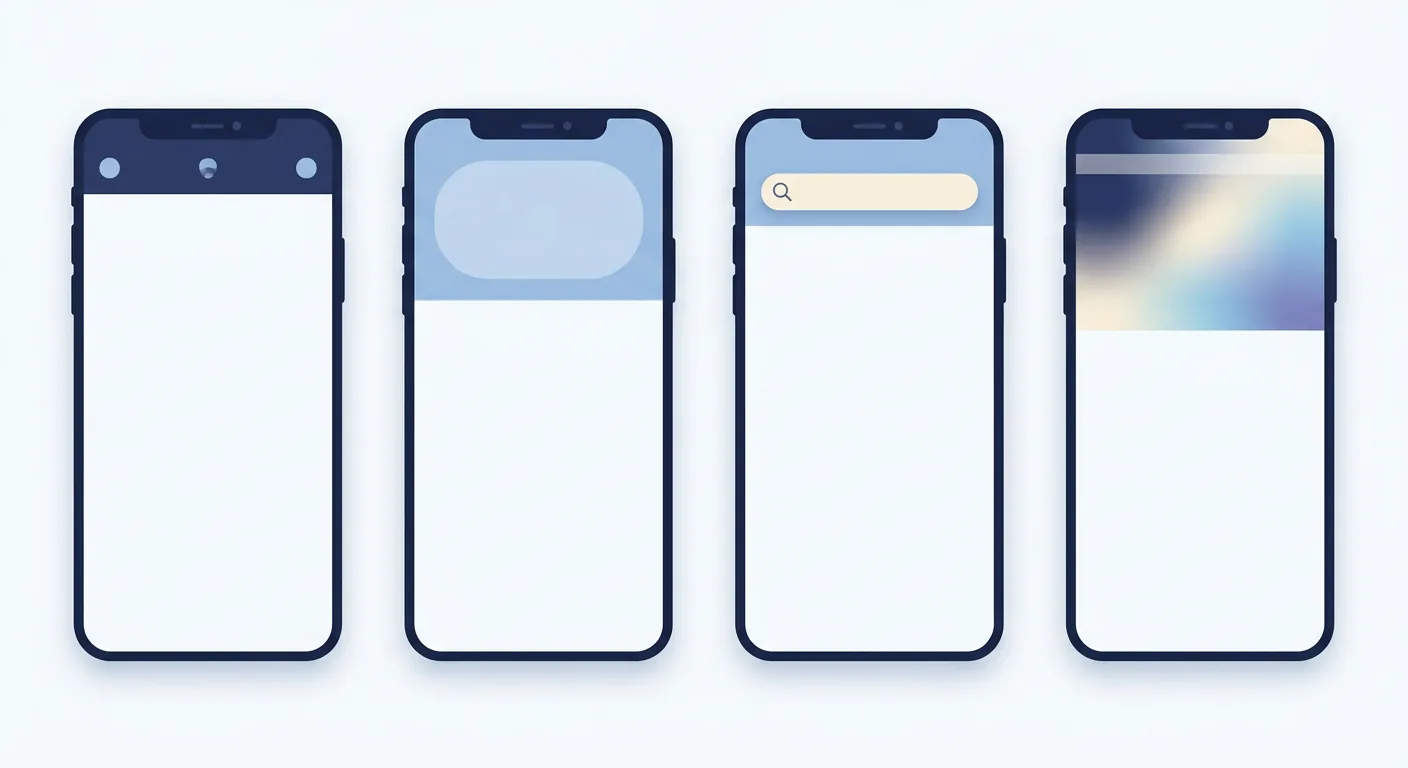
- The standard bar. One title, up to two or three trailing actions, fixed height. This is the default for utility and task screens, and it should be your answer unless you have evidence for something else. Material's small app bar is this pattern.
- The large or collapsing header. A generous title that shrinks into the standard bar as you scroll: iOS large titles and Material's flexible variants. Use it on browsable sections where the title carries meaning, like a library or a store. Never on forms and wizards, where it wastes the exact pixels the task needs.
- The search-first header. A persistent search field replaces the title entirely. This pattern is earned, not chosen: use it when data says users open your app to search (maps, commerce, catalogues). If search is secondary, it belongs in a tab or a single icon, never a fake input pretending to be important.
- The contextual action bar. Hidden until the user selects content, then it appears with relevant actions: share, delete, move. Selecting photos in a gallery is the canonical case. It keeps destructive actions out of everyday reach.
- The transparent or overlay header. The bar floats over hero imagery, letting content fill the screen. Beautiful in screenshots, dangerous in production: it demands a scrim or blur, careful status-bar contrast on both light and dark imagery, and testing against your brightest possible content.
- No header at all. For genuinely immersive consumption: video playback, reading, games. This is a valid pattern only when the user orientation cost is near zero and a single gesture brings controls back. A form with no header is not minimal; it is lost.
The Rules Behind Every Good Header
Whatever pattern you choose, these hold:

- Respect the safe area. Notches, camera cutouts, and status bars are the header's neighbors. Collisions here are the fastest way to look unfinished.
- Targets of at least 44 points. A back arrow you can miss is not a back arrow; it is a trap.
- Three trailing actions, maximum. Anything beyond goes into an overflow menu. A header is a control strip, not a toolbar archive.
- Follow platform placement. iOS centers titles and shows a back label; Android leads with the title and uses an overflow. Mirroring your own invention across both platforms guarantees it feels foreign on one.
- Survive text scaling. Set the system to large text. If your header clips, wraps, or stacks into chaos, it was designed for a poster, not for people.
- Keep heights systemic. Use the platform's standard heights instead of inventing custom values; custom headers break rhythm, cut status-bar contrast, and age badly.
7 Header Mistakes That Make Apps Feel Off
- The icon parade: search, bell, avatar, chat, and menu all competing for the trailing edge.
- Utilities duplicated between header and bottom bar, so two chrome elements fight for the same job.
- A logo on every inner screen. On screen one it is branding; by screen nine it is a tax on your title space.
- The fake search bar: a prominent input that opens nothing meaningful, or a search icon that goes nowhere.
- Back buttons hidden, swapped for custom gestures, or restyled until users cannot find them.
- Transparent headers over busy imagery with no scrim, so the clock and battery fight the photo for contrast.
- A custom height invented for aesthetic reasons that clips at large text sizes and crowds the status bar.
If your header fails three or more of these, an outside design audit usually pays for itself in the first fix.
Headers Done Right: Two Reference Patterns
Both of our public mobile kits handle the header as the discipline it is. Aura, our AI assistant kit, runs the standard-bar pattern: short titles, two quiet actions, and enough calm that the conversation stays the hero. Tourly, our travel-planning kit, earns the search-first pattern, because travelers open the app to find things, and it executes it in full neo-brutalism without once sacrificing legibility. And our shipped quiz app Quizoo shows the same restraint in production: back, title, one action, nothing else competing for the top strip.
Frequently Asked Questions
How tall should a mobile app header be?
Do not invent a number; inherit it. Platform guidelines define standard, medium, and large bar heights, and the safe area adds what the device needs. Custom heights cause clipped text, status-bar collisions, and rhythm that breaks the moment the OS updates.
Should my logo live in the app header?
On the home screen, a small logo can reinforce brand. On inner screens it usually steals orientation space from the title that tells users where they are. Signed-in users already know whose app they opened; give that space back to context.
What belongs in the header versus the bottom navigation bar?
The bottom bar owns destinations: the three to five places users move between all session. The header owns identity, context, and secondary utilities for the current screen. When a control appears in both, keep it where its role lives and delete the duplicate.
When should I use a large collapsing header?
Use it for browsable, content-rich sections where a big title helps orientation and can collapse gracefully into a compact bar on scroll. Avoid it on forms, checkout, and any step-by-step task, where vertical space is the scarcest resource on the screen.
Design the Frame, Not Just the Picture
Headers fail quietly, and headers succeed quietly. Nobody compliments a correct one; users just stop getting lost, stop mis-tapping, and stop noticing the top of the screen at all. Pick the pattern your users' behavior earns, follow the rules, and let the content be the loud part.
| What you need | Where to go |
|---|---|
| A calm standard-bar reference, open for inspection | Aura kit on UI8 |
| A search-first header with real personality | Tourly kit on UI8 |
| A team that sweats this level of detail | Quadiz design services |
| A scoped quote for your app | Get a quote |
Tags:#Mobile App Design#Header UI#UI Patterns
Written byFounder & Lead Developer
Nayef
Visit Website ↗Tech enthusiast, lead developer, and founder of Quadiz.


